
Running a Shopify store means you’re probably wearing the SEO hat along with product sourcing, ads, and customer service. Somewhere in that mix, you’ve likely come across “FAQ schema” and the promise that a bit of code could get your store noticed on Google.
By the end of this guide, you’ll know what FAQ schema actually is, how to add it to your Shopify store step by step, and which practices are still worth following now that the old visual payoff is gone.
What is FAQ schema?
FAQ schema is a small piece of code, written in a format called JSON LD, that you add to a page with frequently asked questions. It doesn’t change how your storefront looks to shoppers. It changes how search engines understand your page.
In plain terms, without schema, Google sees a wall of text on your FAQ or product page. With schema, it sees that this is a question and this is its answer, clearly labeled, the same way a spreadsheet has labeled columns instead of an unstructured list of numbers.
FAQ schema uses the FAQPage type from Schema.org, a shared vocabulary that Google, Bing, and other platforms all recognize. It’s one of the simpler forms of structured data to learn, which makes it a good starting point even if you’ve never touched schema markup on your store before.
It doesn’t change how your Shopify store looks to shoppers. It changes how search engines understand your page, which is also the base of answer engine optimization.
FAQPage vs. Question and Answer schema
Beginners often lump every Q&A format together, but Schema.org actually separates two distinct types, and picking the right one matters:
- FAQPage is for content you wrote and control, meaning a single official answer per question, written by your business, with no visitor voting or submissions involved. This is what almost every small business FAQ page should use.
- QAPage, sometimes called question and answer schema, is meant for community style pages where users submit their own answers and other visitors can vote on or add to them. Think public forums or crowd sourced support boards.
If your FAQ, shipping policy, or product Q&A section is written entirely by your team, use FAQPage. Most Shopify D2C brands will only ever need this type.
The 2026 update you need to know about
This is the part most beginner guides still get wrong, so pay attention here.
For years, FAQ schema was popular because it could make an expandable question and answer dropdown appear directly under your listing in Google search results, giving you extra real estate on the results page for free.
That changed in two stages:
- August 2023: Google restricted the FAQ dropdown to mostly government and well known health websites, cutting most small businesses out already.
- May 7, 2026: Google quietly added a notice to its developer documentation confirming that FAQ rich results no longer appear in Google Search at all, for any site, in any industry. The rollback is happening in phases: the FAQ report and testing support are being removed from Google tools by June 2026, and API access to old FAQ data ends in August 2026.
So the visible payoff, that expandable box, is gone, full stop, for everyone.
Here’s the part that matters, though: Google has said the FAQPage markup itself is still valid and that unused structured data doesn’t hurt your site. Existing markup doesn’t need to be ripped out. The distinction is between two different things that used to get lumped together:
| FAQ rich result (the visible box) | FAQ schema (the underlying code) | |
| Status in 2026 | Retired for all sites | Still valid Schema.org markup |
| What it did | Added a visual dropdown in Google Search | Labels Q&A content for machines |
| Should you use it for this? | No, it won’t appear anymore | Yes, for the reasons below |
Should small businesses still bother with it?
Yes, and here’s the real, confirmed reason why. Google’s own documentation describes structured data’s actual job. It’s a standardized way of classifying page content so Google can understand what a page is about.
That’s the stated purpose, rich result or not. For a Shopify D2C brand, this matters in a few specific spots.
Shipping and returns FAQs are one example: Google can more reliably understand your shipping windows, return window, and exchange policy when they’re labeled as Q&A rather than buried in a paragraph on your policies page.
Product specific FAQs are another: Sizing, materials, care instructions, and subscription terms are often duplicated across product descriptions, help center articles, and a footer FAQ page, and clear labeling helps here too.
Trust and conversion pages matter as well: Shopify D2C brands lean heavily on FAQ content to reduce pre-purchase hesitation such as sizing doubts, shipping anxiety, and general trust concerns. Clean, well-structured content is good practice on these pages regardless of what Google does with it visually.
Two other things Google has confirmed work in your favor. First, adding FAQ schema carries no downside. Google has said unused or non-rich result producing structured data doesn’t cause problems, so there’s no risk in keeping it in place.
Second, doing it properly, meaning matching the code to your visible text, keeping answers accurate, and following general structured data guidelines, is simply good technical practice, the same way a clean theme or a proper sitemap is, independent of any single feature reward.
If you want to see what else is worth fixing on your Shopify store, this AEO checklist is a good place to start.
Now, the honest caveat. Don’t add it expecting a specific payoff you haven’t been promised. Google’s AI features documentation states plainly that structured data isn’t required for AI Overviews or AI Mode, and there’s no special schema.org markup needed for them.
Treat any claim that FAQ schema boosts AI visibility as unconfirmed, not fact.
If your goal is to show up in AI answers, here’s what actually helps your Shopify store get cited by AI tools like ChatGPT and Perplexity.
Put together, add FAQ schema because it correctly describes real content you already have, such as shipping, returns, sizing, and subscriptions, not because you’re chasing a specific ranking or visibility reward.
FAQPage JSON-LD schema: How it works
FAQPage JSON LD schema lives in your page’s HTML as a script block using JSON LD, short for JavaScript Object Notation for Linked Data. It doesn’t render on the page. Shoppers never see the code itself, only your normal, visible FAQ text.
The structure is simple:
- A wrapper says “this is a FAQPage”
- Inside it, a list of question and answer pairs
- Each pair has a Question (the exact question text) and an acceptedAnswer (the exact answer text)
JSON LD is the format Google recommends over older alternatives like Microdata, mainly because it’s easier to read, easier to maintain, and doesn’t require weaving extra attributes into your theme’s visible HTML.
The golden rule across every version of Google’s guidance, past and present, is that the text inside the schema must match the text visible on the page, word for word. Schema is a label, not a place to hide extra content, keywords, or promotional copy that isn’t shown to shoppers.
Where to put FAQ schema on a Shopify store
This is the question most Shopify D2C brands actually get stuck on, since FAQ type content on a Shopify store is often scattered across several places.
A dedicated FAQ page, such as a pages/faq URL, is the cleanest option, and the easiest place to add schema without touching product templates.
Your shipping and returns policy page is a strong candidate too, if that page already reads like a Q&A rather than legal style prose.
Individual product pages are only worth it if a product has genuinely unique questions, like sizing, materials, or compatibility, that don’t apply store wide. Don’t copy the same generic FAQ block onto every product page. See common mistakes below.
A common, low-effort setup is to keep a single, well-maintained FAQ page with schema, and link to it from product pages and checkout, rather than duplicating markup everywhere.
How to implement FAQ schema on your site?
You don’t need to be a developer to figure out how to implement FAQ schema. Here’s the process for a typical small business site:
- First: Write real FAQs. Before touching any code, write four to eight genuine questions your customers actually ask, pulled from support tickets, DMs, or post purchase emails. Common D2C ones include shipping times, return and exchange windows, sizing, subscription cancellation, product care, and international shipping. Put them as normal visible text on a page.
Second: Generate the schema code. Use a free FAQ schema generator, paste in your exact questions and answers, and it will output a ready-to-use JSON LD code block.
Third: Add the code to your Shopify theme. You have a few options. Many Shopify apps, including FAQ or accordion builder apps and SEO suites with a schema module, will generate and inject this automatically with no manual code required. You can also edit the theme manually.
In the Shopify admin, go to Online Store, then Themes, then Edit code. Open the template for your FAQ page or a relevant liquid section file, and paste the script tag with type application/ld+json before the closing body tag or into the page’s specific template file.
One caution here, if you add it globally in theme.liquid rather than a specific page template, make sure it only outputs on the actual FAQ page. You don’t want the same schema block firing on every page of your Shopify store.
Fourth: Test it. See the testing section below.
Fifth: Leave the rich result question aside. Don’t expect, or build for, a visible dropdown in search results anymore. That’s no longer part of the deal.
FAQPage schema example
Here’s a working example you can adapt. Replace the question and answer text with your own Shopify store’s content, keeping it identical to what’s visible on the page.
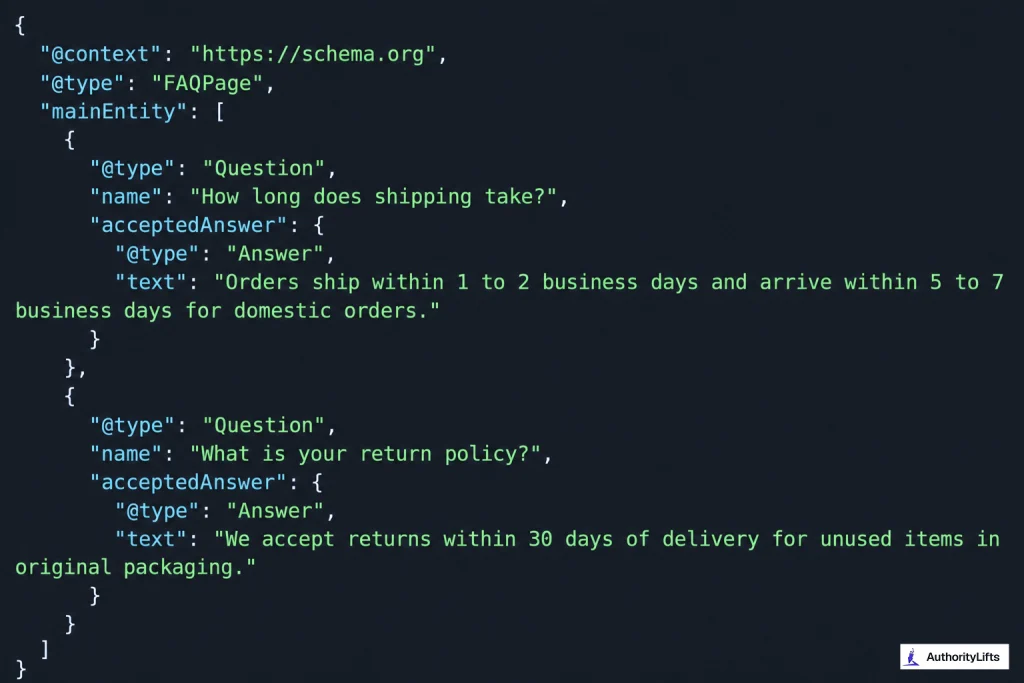
This example follows the same structure Google’s documentation describes, a FAQPage container holding a list of Question and acceptedAnswer pairs, with no hidden or promotional text.
FAQ schema best practices
Following a few FAQ schema best practices will keep your markup clean, accurate, and worth maintaining long after the rich result feature is gone:
- Real customer questions: Pull from actual support tickets, DMs, or reviews, not guesswork or keyword stuffing.
- Concise answers: A sentence or two per answer is usually enough, and it’s easier for shoppers scanning on mobile.
- Exact match to visible text: Don’t write one version for shoppers and a different one in the code.
- No promotional language: Keep answers factual, since Google explicitly discourages sales copy inside FAQ markup.
- Only real FAQs: Use FAQPage where there’s an actual FAQ, not on every product page just to add more schema.
- Keep it updated: Revise the markup whenever shipping windows, return periods, or subscription terms change, so it never goes stale next to your actual policy.
- No duplicate blocks: If ten products share an identical FAQ, put it on one policy or FAQ page instead and link to it, rather than repeating the block everywhere.
Common mistakes to avoid
Even with good intentions, a few small errors can quietly undermine your FAQ schema. Here’s what to watch for:
- Hidden or off page content: If the answer isn’t visible to a shopper on that page, don’t include it in the schema.
- Expecting a search results dropdown: That visual feature is retired for every site in 2026, so treat schema as a comprehension aid, not a ranking hack.
- Copy pasting generic FAQs from another Shopify store: Generic, low value questions, like a basic definition of ecommerce, add little and can look thin if they don’t fit your actual brand.
- Broken JSON syntax: A missing comma or bracket can invalidate the whole block, so always test after adding it, especially after a theme update.
- Duplicating the same FAQ block on every product page: Use FAQ schema only where there’s genuinely unique Q&A content.
How to test your markup?
Once your FAQ schema is live, don’t just assume it’s working. Here’s how to confirm it actually is:
- Schema.org Validator: Confirms your code is technically valid JSON-LD (this remains the recommended check going forward, since Google is phasing out FAQ specific testing).
- Google’s Rich Results Test: Still useful for catching syntax errors today, though Google has said dedicated FAQ support will be removed from this tool in June 2026.
- View page source: After adding the code, view your live page’s source and search for FAQPage to confirm it actually published correctly.
Conclusion
FAQ schema isn’t the ranking shortcut it used to be, but for a Shopify D2C brand it’s still worth doing right. Write real, Shopify store-specific FAQs about shipping, returns, sizing, and subscriptions, mark them up correctly with FAQPage JSON LD on a dedicated page or your policy page, and keep the code matched to your visible text. Skip it if you’re only chasing a search feature that no longer exists.
If you’d rather have an expert handle this for you, ControlF5 helps D2C and Shopify brands with structured data, technical SEO, and storefront optimization, done right the first time.
Frequently asked questions (FAQs)
Question: Should I remove FAQ schema from my Shopify store now that rich results are gone?
Answer: No. Google has confirmed unused structured data doesn’t hurt your site, so there’s no need to remove existing markup.
Question: Do I need a developer to add FAQ schema on Shopify?
Answer: No. Many Shopify FAQ and SEO apps generate it automatically, and free schema generators can build the code if you want to add it manually through Edit code.
Question: I already added FAQ schema years ago. Do I need to update it?
Answer: Only if your answers changed. The code just needs to keep matching what’s visible on the page, word for word. Check it whenever you update shipping or return policies.
Question: Can I use FAQ schema on every product page?
Answer: Only where there’s real, unique FAQ content per product. Duplicating the same generic block across every product page adds no value and can look like low quality markup.
Question: Will adding FAQ schema hurt my SEO if I don’t get a rich result?
Answer: No. It carries no penalty. Worst case, it simply doesn’t produce a visible feature, but the markup is still accurate and valid.